Local-First AI Studio for Audio & Video
Transcribe, Translate & Dub
Up to 4x Faster Inference with MLX & Apple Silicon
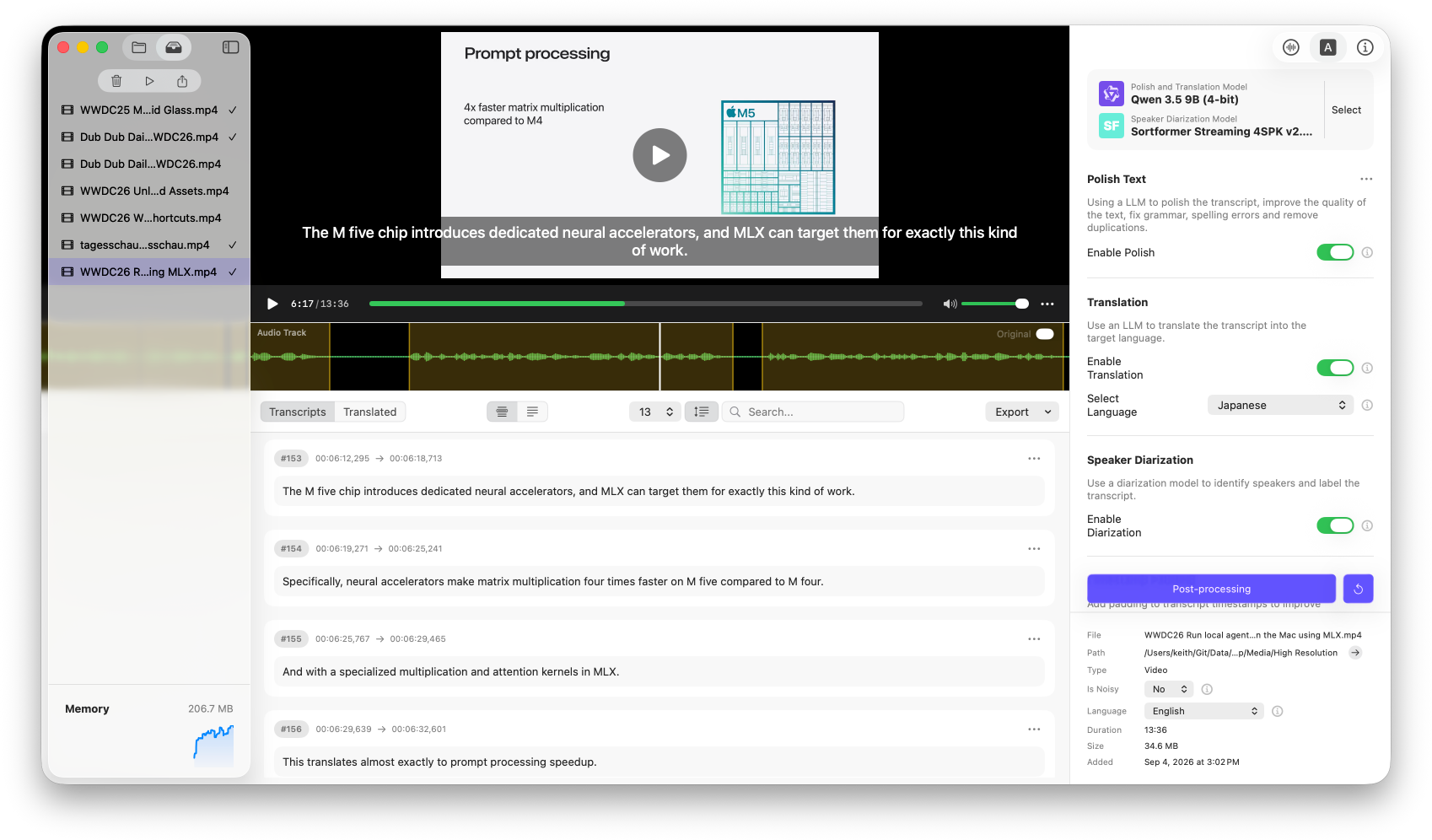
Transcribe, translate, and dub any audio or video file with complete privacy on your Mac. Powered by Apple Silicon and native MLX optimizations for up to 4x faster inference, WaveCap is an all-in-one local AI studio with 50+ open-source models—delivering studio-grade transcription, 50+ language translations, speaker diarization, vocal isolation, and timeline-aligned video dubbing with zero cloud fees.

Why You'll Love It
Up to 4x Faster Inference
Native Apple Silicon and MLX runtime optimizations deliver extreme local performance.
20+ Transcription Models
Choose from Whisper, Parakeet, Qwen3 ASR, Cohere Transcribe, Voxtral, and more.
Translate to 50+ Languages
Translate subtitles and transcripts using local LLMs like Qwen, Gemma, and Llama.
Timeline-Aligned AI Dubbing
Generate realistic voice tracks matched to your video's timing for fully localized output.
50+ State-of-the-Art Models
Test top-tier open models for noise isolation, ASR, translation, diarization, and TTS.
COMPREHENSIVE PIPELINE
1. Smart Import & Automated Preprocessing
Effortlessly handle individual files, batches, or deeply nested folder trees with background scanning and zero-friction setup. When media is added, WaveCap automatically standardizes audio to a high-fidelity 44.1 kHz 16-bit mono WAV format to maximize pipeline speed and maintain predictable system memory usage. During import, bundled Core ML models—Silero VAD v6.2.1 and ECAPA-TDNN VoxLingua107—run entirely on the CPU to evaluate chronological speech blocks and identify spoken languages without taxing your GPU or Neural Engine. This intelligent pre-analysis ensures your media is perfectly formatted and tagged before full processing begins, all while keeping your Mac awake and responsive.
2. Advanced Vocal Isolation & Audio Cleanup
Transform noisy, echo-filled, or poorly recorded media into studio-grade audio prior to transcription. WaveCap leverages state-of-the-art vocal separation and speech enhancement engines, including DeepFilterNet (v2/v3) and Demucs/MDX architectures, to strip away room reverb, wind, traffic, and background music. The system automatically evaluates background noise levels upon import to determine if cleanup is required, while giving you full manual override to force or disable processing per file. By isolating clean vocal stems and preserving background audio separately, WaveCap drastically boosts speech-to-text accuracy and retains clean ambient audio tracks for future mixing.
3. Precision Speech-to-Text (STT)
Convert spoken dialogue into word-accurate, timestamped text using over 20 state-of-the-art open-source speech recognition models. WaveCap gives you total freedom to select the exact model family that fits your project's balance of speed, memory usage, and language complexity—including Whisper (Tiny to Large v3 Turbo), Parakeet, Qwen3 ASR, Cohere Transcribe, SenseVoice, Voxtral, and Nemotron ASR. Native Apple Silicon and MLX runtime optimizations deliver up to 4x faster local inference, allowing you to transcribe long interviews, fast-paced podcasts, and dense lectures locally with pinpoint accuracy, zero cloud token costs, and total data privacy.
4. Local LLM Text Polishing & Translation
Refine raw transcriptions, correct grammatical errors, and translate content into over 50 global languages without sending a single byte to external APIs. Powered by local Large Language Models such as Qwen 3.5, Gemma 4, Llama 3.1, and Nemotron 3 Nano, WaveCap intelligently cleans up messy transcripts by fixing broken sentences, removing filler words, and correcting specialized domain terminology. You can seamlessly translate transcripts into full subtitle files while maintaining semantic context and formatting, ensuring high-quality multilingual localization with zero recurring subscription fees.
5. Speaker Diarization
Automatically distinguish, separate, and label individual voices across complex multi-speaker recordings. Driven by the Sortformer Streaming 4SPK diarization engine, WaveCap analyzes vocal characteristics throughout the audio timeline to identify speaker transitions and assign distinct labels for up to four unique speakers. Whether you are processing panel discussions, casual podcast conversations, or formal meeting recordings, speaker labels are seamlessly mapped to transcript segments and can be embedded directly into exported SRT/VTT subtitle files, plain text documents, CSVs, or structured JSON data.
6. Timeline-Aligned AI Dubbing (TTS)
Turn translated subtitles into realistic, fully localized voice tracks that stay locked to your original video timing. Utilizing local Text-to-Speech models like Qwen3 TTS, OmniVoice, and Breeze TTS, WaveCap synthesizes natural-sounding dialogue mapped precisely to each subtitle segment's timestamps, using original audio or diarized speaker clips as voice references. When vocal separation is enabled, WaveCap can recover and re-mix the original background audio and music behind the new voiceover, allowing you to export standalone audio files or a fully dubbed MOV video that replaces original speech while preserving video quality and ambient soundscapes.
Powered by Leading On-Device AI Models
WaveCap offers flexible, configurable pipelines powered by open-weights models optimized for Apple Silicon:
Pipeline Step
Supported Models & Runtimes
Speech-to-Text (STT)
Whisper (Tiny to Large v3 Turbo), Parakeet Series, Qwen3 ASR, Cohere Transcribe, Voxtral Mini 4B, SenseVoice
Text Polishing & Translation
Gemma 4 (E2B / E4B), Qwen 3.5 (4B / 9B), Nemotron 3 Nano 4B
Vocal Isolation & Cleanup
HDemucs v3, HTDemucs (Standard / Fine-tuned / 6-source), MDX Series, DeepFilterNet (v2 / v3)
Voice Generation / Dubbing
Qwen3 TTS, OmniVoice, Breeze TTS
VAD & Diarization
Silero VAD (v5 / v6), Sortformer Streaming 4SPK v2.1
The Engine Behind WaveCap: Built for Apple Silicon with MLX
What is MLX?
MLX is Apple Silicon's official open-source machine learning framework, engineered specifically for M-series chips (M1 through M4 and beyond). Unlike legacy AI frameworks adapted from cloud servers, MLX taps directly into Apple's unified memory architecture and Neural Engine. It acts as a lightweight, lightning-fast engine capable of running state-of-the-art open-weights models (like Whisper, Qwen, and Gemma) right on your Mac.
Why WaveCap Uses MLX
Unified Memory Advantage
Cloud-focused frameworks force models to constantly copy data between the CPU and GPU. MLX takes advantage of Apple's shared RAM architecture, allowing heavy models (like 9B LLMs or 1.7B Whisper variants) to run with minimal overhead and zero memory duplication.
Blazing Fast On-Device Inference
MLX delivers peak single-stream performance. By running model operations directly on the Mac's GPU and Neural Engine, WaveCap transcribes and polishes multi-hour files in a fraction of the time without overheating your machine.
100% Offline & Zero Subscription
Because MLX handles model runtimes locally, WaveCap doesn't need to send your private audio to remote API endpoints like OpenAI or Anthropic. You get server-grade accuracy without recurring monthly fees or internet dependency.
Low Power & Battery Efficient
Engineered to follow Apple's native power management guidelines, MLX allows WaveCap to run heavy batch queues in the background without draining your MacBook's battery or spinning up loud cooling fans.
Frequently Asked Questions
General & Privacy
Do my audio files or transcripts ever get uploaded to the cloud?
No. WaveCap is 100% local-first. All processing, from vocal separation and transcription to AI polishing, happens directly on your Mac. Your files and transcripts never leave your device.
Does WaveCap require an active internet connection to work?
An internet connection is only needed once when you initially download your chosen AI models. After the models are downloaded, WaveCap works completely offline.
How does WaveCap protect my data compared to web-based transcription tools?
Web tools require you to upload confidential audio to third-party servers. WaveCap runs open-weights AI models locally via Apple MLX, ensuring total data privacy and zero risk of leaks.
Hardware & System Requirements
What are the system requirements for running WaveCap?
WaveCap requires macOS 26.0 or later. While it can run on Intel Macs, an Apple Silicon Mac (M1, M2, M3, M4, or later) is strongly recommended for optimal speed and memory efficiency.
How much storage space do the AI models require?
Model sizes range from lightweight options (~100 MB) to large, high-accuracy speech and LLM models (up to 4 to 8 GB). You can choose and download only the specific models you need.
Will running heavy models slow down my Mac or drain the battery?
WaveCap is built using Apple's native MLX framework, which optimizes energy consumption and utilizes Unified Memory to run background jobs cleanly without overheating your machine.
Features & Workflow
What media formats are supported?
WaveCap supports popular video formats (.mp4, .mov, .m4v, .3gp) and audio formats (.mp3, .m4a, .wav, .aac, .aiff, .ac3). You can import individual files or drop entire folders for batch conversion.
Can WaveCap distinguish between different speakers?
Yes. WaveCap includes integrated speaker diarization (using Sortformer) to automatically identify, separate, and label different speakers in your recordings.
What subtitle and text formats can I export?
You can export transcripts as plain text (.txt), subtitle files with optional speaker tags (.srt, .vtt), or structured data for analysis (.csv, .json). All subtitle files use UTF-8 with BOM for universal player compatibility.
How does the AI text polishing work?
After transcription, WaveCap can pass the text to a local LLM (like Gemma or Qwen) to remove filler words ("um," "uh"), correct grammatical slips, or translate the transcript into another language, all offline.