Animated, Health,
& Custom Widgets for Your iPhone
Transform your Home Screen, Lock Screen, and StandBy mode with
frame-by-frame animated stickers, pixel art, photo layouts, and live HealthKit charts.
Lively Widget turns your static iPhone screen into an expressive, functional display for your Home Screen, Lock Screen, and StandBy mode using a powerful layer-based design engine. Connect seamlessly with HealthKit to track steps, heart rate, and vital metrics via clear 24-hour and 7-day charts, or bring your device to life with frame-by-frame GIF stickers, moving quotes, and battery-efficient animations. Whether you want to draw retro pixel art from scratch, convert photos using local AI models, design custom analog clocks, or build photo layouts with automatic background removal, Lively Widget gives you total creative control over your device.

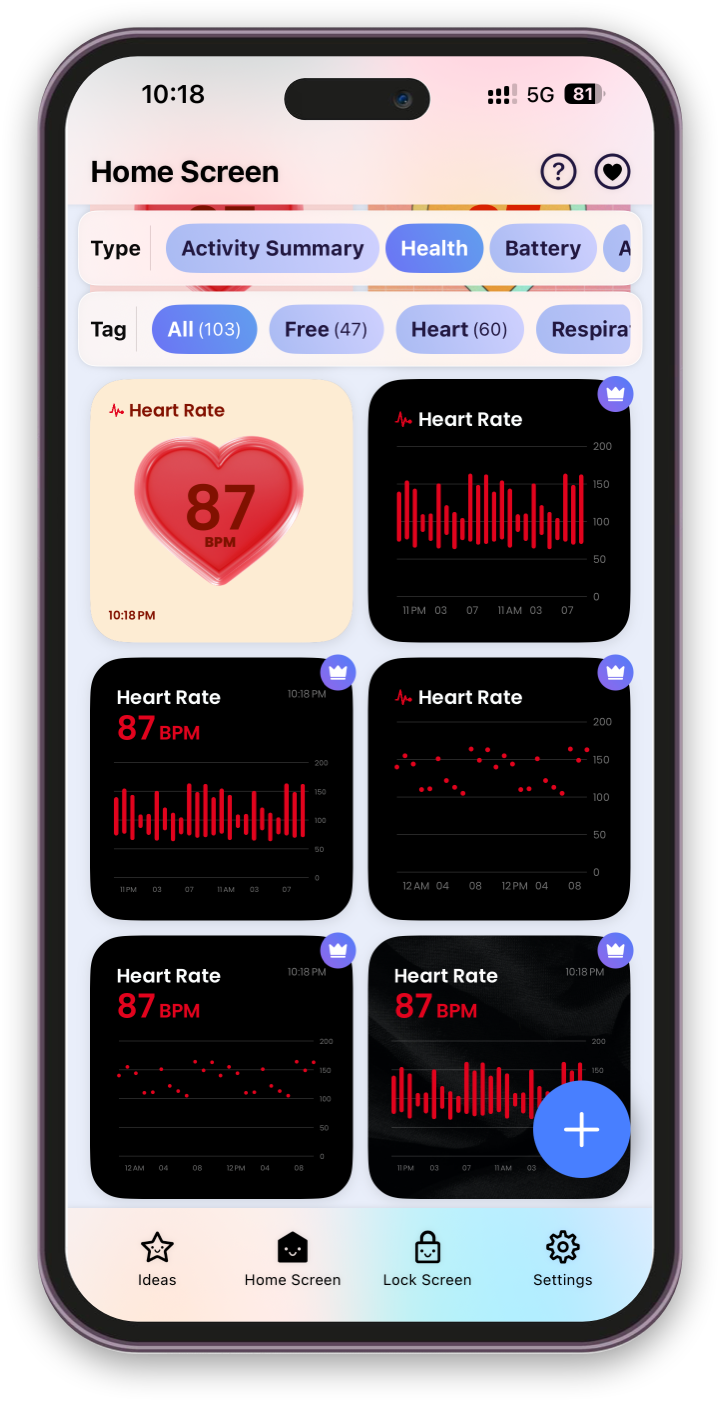
Why You'll Love It
Breathe Life into Your Screen
Create frame-by-frame animated widgets using custom GIFs, stickers, moving quotes, and Lottie effects.
Comprehensive Health & Activity Tracking
Track 15+ health metrics, from steps and heart rate to blood glucose, with customizable 24-hour and 7-day charts.
Deeply Customizable Editor
Fine-tune layers, typography, borders, rotations, shadows, and frame rates for Home Screen, Lock Screen, and StandBy mode.
Pixel Art Canvas & ML AI Tools
Design pixel art from scratch or use built-in Core ML models to automatically convert photos into pixelated art or remove backgrounds.
Why Lively Widget?
Most widget apps restrict you to static images and plain digital clocks. Lively Widget gives you a full layer-based design engine built on native WidgetKit technology. Whether you want to monitor complex HealthKit metrics, display a rotating frame-by-frame photo album of loved ones, or pixelate your favorite photos into retro art, Lively Widget makes your iPhone uniquely yours.
Widget Categories & Features
Health & Fitness Tracking
Full HealthKit integration. Monitor heart rate variability, energy burned, step counts, blood oxygen, sleep analysis, and blood pressure via clean chart views.
Animated Stickers & Text
Add animated emojis, cute GIF characters, and moving motivational quote widgets to both your Lock Screen and Home Screen.
Pixel Art Studio
Create custom pixel art on an empty grid, browse a curated library of pixel presets, or convert any photo into pixel art instantly using AI models.
Photos & Dynamic Clocks
Build photo widgets with customizable frames, backgrounds, and overlays, paired with analog clocks, custom time zones, and battery indicators.
Health Metric Breakdown
Lively Widget turns your raw health data into visual, readable widgets on your screen:
Health Category
Tracked Metrics
Chart Views
Activity & Movement
Active Energy, Exercise Time, Stand Hours, Steps, Walking Distance
24-Hour / 7-Day
Heart & Vitals
Heart Rate, Resting HR, HR Variability, Blood Oxygen, Respiratory Rate
24-Hour / 7-Day
Body & Lab Metrics
Blood Pressure, Blood Glucose, Environmental & Headphone Audio Levels
24-Hour / 7-Day
Mobility
Walking Speed, Step Length, Walking Asymmetry, Stair Speed
24-Hour / 7-Day
Frequently Asked Questions
Does Lively Widget support iOS 17 StandBy Mode?
Yes! Most Home Screen and Lock Screen widgets are fully compatible with iOS StandBy mode, allowing you to turn your charging iPhone into a personalized display.
Is my HealthKit data private?
Absolutely. Your health metrics are read directly from your local HealthKit database solely to display them on your widgets. No health or personal data is ever collected, uploaded, or sold.
How do animations work without draining my battery?
Lively Widget uses Apple's native WidgetKit timeline engine to schedule efficient frame-by-frame updates, delivering smooth animations without consuming excessive battery life.
What iOS version is required?
Lively Widget requires iOS 16.0 or later for Home and Lock Screen support.